A chatbot that gives a wrong answer is embarrassing. An agent that runs the wrong command is an incident. The moment an AI system is handed tools such as a shell, a database connection, a ticketing API or a cloud SDK, it stops being a content risk and becomes an identity risk: something acting inside your estate with real credentials, deciding for itself what to do next, and taking instructions from whatever text happens to land in its context window.
This is a playbook for the security leader who has been asked, usually after the first agent is already in production, “are we in control of this?” It covers what to inventory, which risks matter, what policy to set, how to enforce it at the moment of the tool call, and how to report on it to the board.
In short
- Treat agents as identities, not features. An agent with a shell tool and a cloud role is a privileged user that can be talked into things. Govern it the way you govern service accounts.
- You cannot govern what you have not found. Agents, models and MCP servers appear in code long before anyone files a review request. A scan-derived inventory is the only one that stays current.
- Map findings to the OWASP Top 10 for LLM Applications. It gives security, engineering and audit one shared vocabulary; excessive agency (LLM06) is the category that matters most for agents.
- Decide before the tool runs. A policy check on every proposed tool call (allow, deny or require approval) is the control that limits damage when a prompt injection gets through.
- Report on behaviour, not intentions. The board question is “what did our agents do, and what did we stop?”. Answer it from the tool-call record.
Why agents are a different kind of risk
Three things separate an agent from the applications your AppSec programme was built for.
Its instructions and its data arrive on the same channel
A conventional application separates code from input. An LLM does not: the system prompt, the user’s message, a retrieved web page and the body of a support ticket are all just text in one context window. That is why prompt injection is not a bug you patch once. Any content the agent reads can try to redirect it, and an agent that reads customer emails, web pages or repository files is reading attacker-controlled content as a matter of course.
It chooses its own actions
A web application does what its code path says. An agent decides at run time which tool to call and with what arguments. Testing every path in advance is not possible, so the controls that work are the ones that constrain what it can do, rather than predicting what it will do.
It holds credentials
Every tool is a capability backed by a credential: the shell runs as some user, the database tool connects as some role, the cloud SDK assumes some IAM role. The blast radius of a compromised agent is the union of everything its tools can reach. In most first deployments that union is far wider than anyone intended, because the fastest way to make a prototype work is to give it everything.
A design review and a pen test before go-live. The agent then gains tools, prompts change weekly, a new MCP server is added to a config file, and none of it is reviewed again.
Every push re-inventories models, agents and MCP servers. Policy is checked on each proposed tool call, and every call the agent made is recorded and compared with what it was allowed to do.
The OWASP Top 10 for LLM Applications, for agents
The OWASP Top 10 for Large Language Model Applications (the 2025 edition) is the closest thing the industry has to a shared taxonomy. Not every category applies equally to agents. Here is how the ones that do translate into things you can find in code, and what InsightFortify looks for in each.
| Category | What it means for an agent | What a repository scan flags |
|---|---|---|
| LLM01 Prompt injection | Untrusted text steers the agent into calling tools it should not | Request input formatted straight into a prompt |
| LLM02 Sensitive information disclosure | Secrets or data leave through the model or its configuration | A literal secret in an MCP config; an LLM provider key exposed to the browser |
| LLM03 Supply chain | A model or tool server you pulled in runs code you did not review | Pickle model files that import os, subprocess or similar on load; trust_remote_code=True; an MCP server launched with an unpinned npx or uvx |
| LLM05 Improper output handling | The model’s answer is executed rather than read | Model output reaching eval, exec, a shell or a SQL query in the same function |
| LLM06 Excessive agency | The agent holds more capability than its job needs | Shell, Python REPL and unrestricted file tools; LangChain allow_dangerous_* flags; AutoGen running generated code outside Docker; filesystem MCP servers rooted at / or the home directory; shell MCP servers |
| LLM07 System prompt leakage | Secrets placed in the prompt will eventually be repeated back | Credentials written into a system prompt |
| LLM10 Unbounded consumption | A loop that never ends burns budget and can amplify an attack | An agent with no iteration limit |
Two notes on method. First, none of this needs the model to run: code is read through its syntax tree and model files are read opcode by opcode without being unpickled, so a scan cannot itself trigger a malicious model. Second, the categories not listed (data and model poisoning, misinformation, vector and embedding weaknesses) are real risks, but they are largely about how a model was trained or what it retrieves, and are not visible as patterns in your repository. Be wary of any tool that claims to detect them from source code.
Excessive agency is the one to fix first
Prompt injection cannot be fully prevented today; every serious guidance document, OWASP’s included, says so. What you control is what happens after an injection succeeds. An agent with read-only tools that has been hijacked can leak what it can read. An agent with a shell that has been hijacked can do anything that shell can do. LLM06 is where the blast radius is decided.
Step one: find every model, agent and MCP server
Ask engineering teams to list their AI usage and you will get an honest, incomplete answer that is out of date within a month. The reliable inventory is the one derived from the code. On every repository scan, InsightFortify’s AI analyser records:
- Models: weight files in the tree (pickle, safetensors, GGUF, ONNX, Keras and
others), and models the code names, such as
from_pretrained("org/model"),model="gpt-4o"orhf_hub_download. - Agents: LangChain, CrewAI and AutoGen agents, with the tools each one is given.
- MCP servers: every server listed in an MCP client configuration
(
mcp.json,claude_desktop_config.jsonand similar), with its command, arguments and environment.
MCP deserves particular attention. The Model Context Protocol has made it very easy to give an
assistant new tools: one line in a JSON file and the agent can read a filesystem, open GitHub
issues or run commands. That convenience is the risk. An MCP server launched with
npx some-package fetches whatever version is current at start-up, which is a supply
chain decision made silently on every launch, and a filesystem server rooted at / gives
the agent the whole disk.
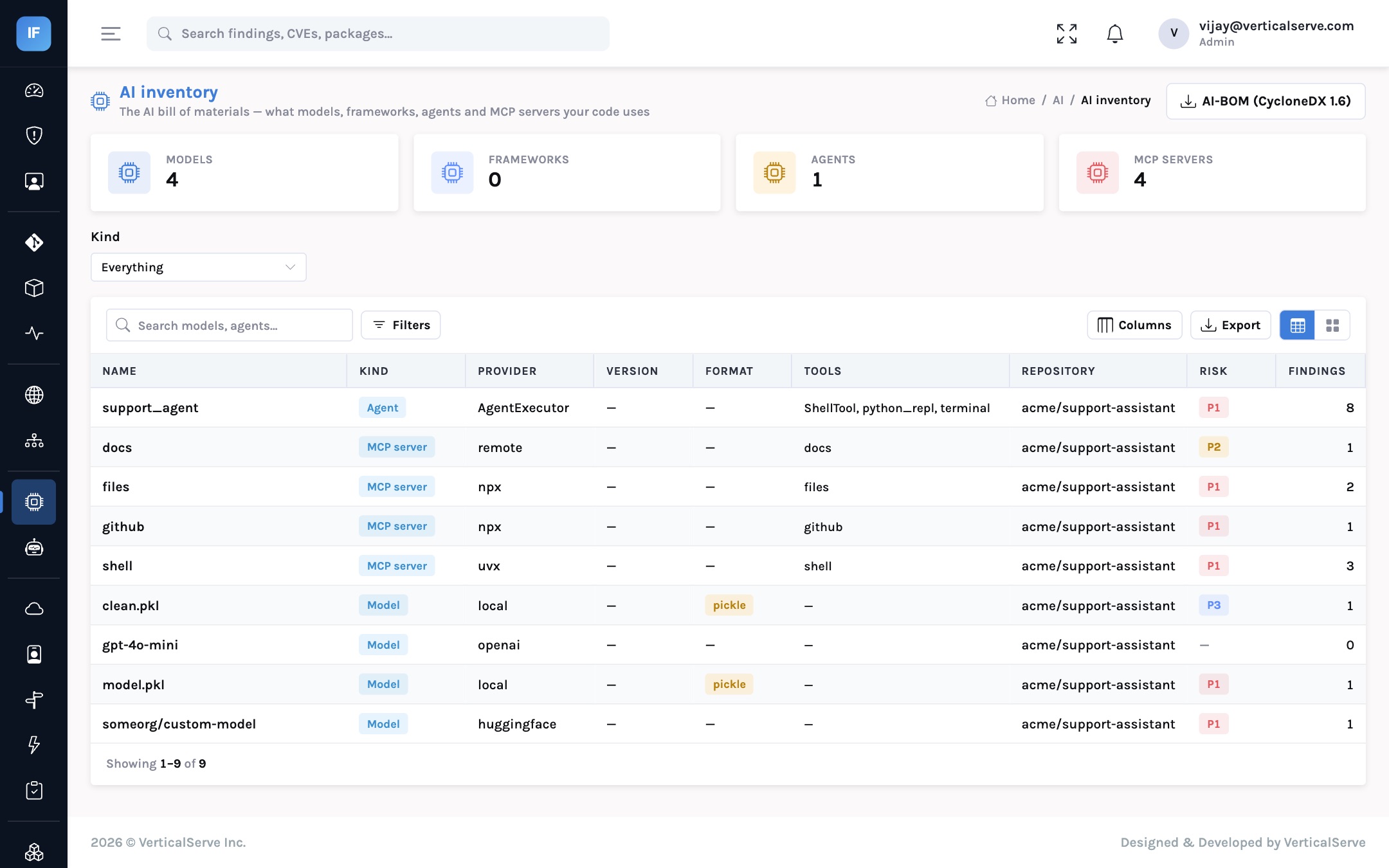
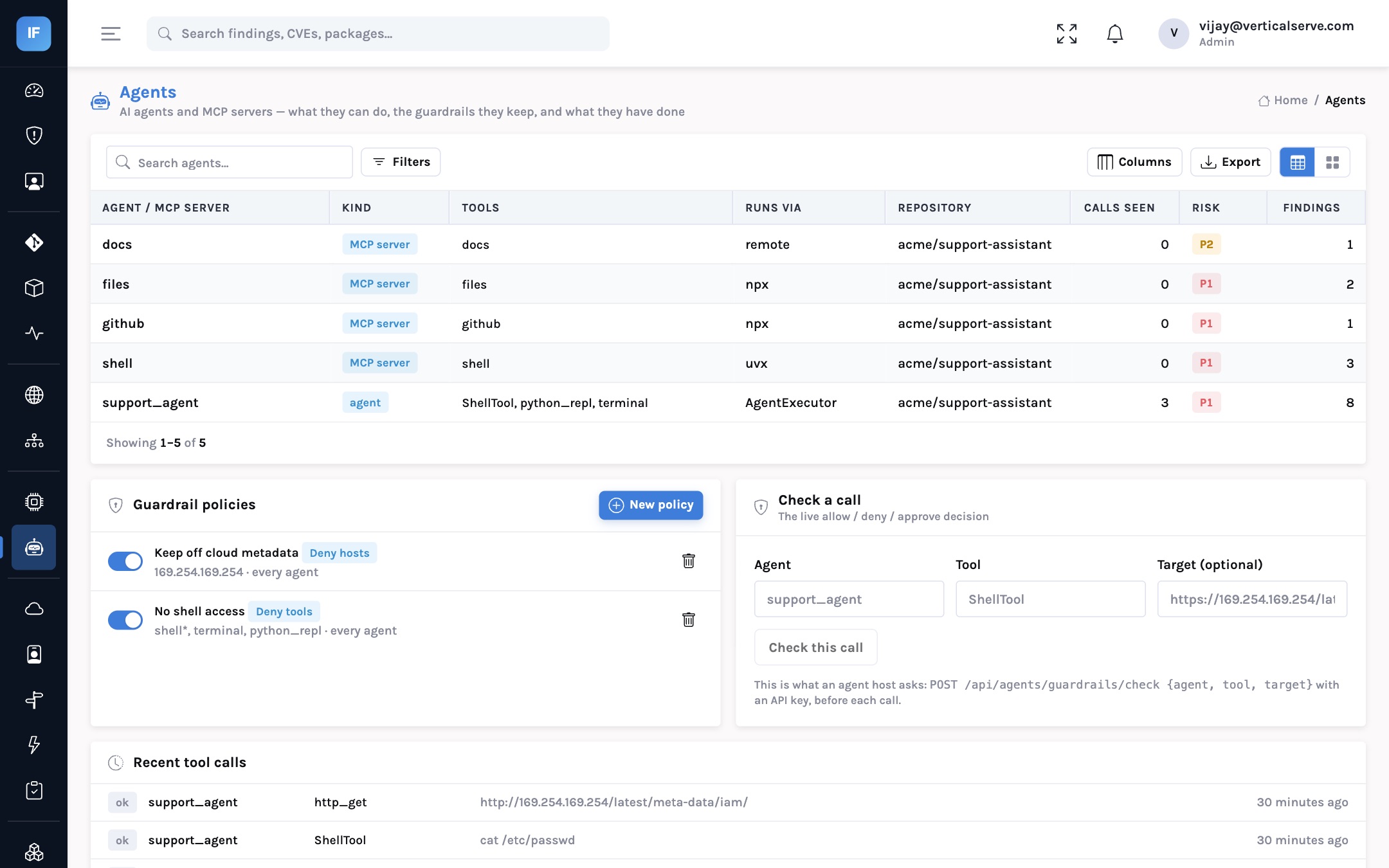
support_agent holds a shell tool, a Python REPL and a terminal; three of its MCP servers are unpinned or shell-capable, so each carries a P1.In our demo estate, a sample customer-support assistant (acme/support-assistant), the
scan found one agent and four MCP servers. The agent had been given ShellTool,
python_repl and terminal. Three of the MCP servers were launched through
unpinned npx or uvx commands or exposed a shell. None of this is unusual for
a prototype. All of it is unacceptable for an agent that reads customer messages.
Step two: set policy as least privilege for agents
The inventory tells you what each agent can do. Policy says what it may do. InsightFortify expresses agent policy as four rule types. They are deliberately simple, because a policy a security lead cannot read in ten seconds will not be reviewed.
| Rule | What it does | Typical use |
|---|---|---|
deny_tool | Refuse any call to a tool matching the pattern | shell*, terminal, python_repl for every customer-facing agent |
require_approval | Answer “needs a person” for matching tools | Refunds, deletions, outbound email, production changes |
deny_host | Refuse calls whose target host matches | 169.254.169.254 (cloud instance metadata), anything outside *.internal.example.com |
max_calls_per_hour | Refuse once an agent exceeds a call rate | A ceiling on runaway loops and on automated abuse |
Patterns are shell-style wildcards, a policy can bind named agents or all of them, and when two policies disagree, deny wins over approval and approval wins over allow. The instance-metadata rule is worth adopting everywhere on day one: the most common way a hijacked cloud workload turns into a stolen credential is a request to the metadata endpoint, and no legitimate agent needs it.
Step three: enforce at the moment of the tool call
Policy is enforced in three places, and each catches something the others miss.
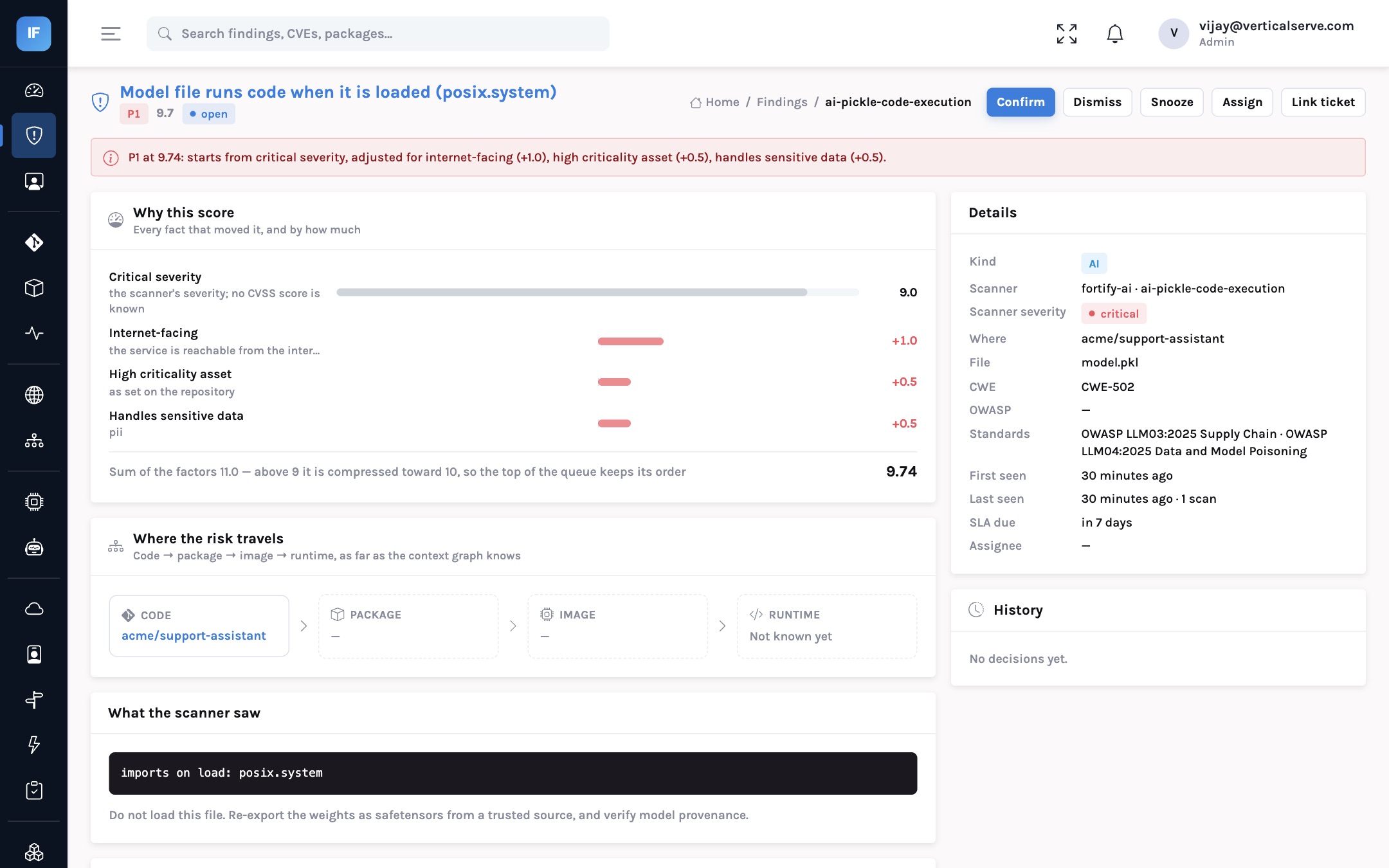
An agent or MCP server that holds a denied tool becomes a finding before it ever calls it. Changing a policy re-evaluates the whole inventory.
The agent host calls POST /api/agents/guardrails/check with the agent, the tool and the target, and receives allow, deny or require_approval with the policy and reason.
The host reports the calls it made to POST /api/agents/events. A denied tool or host, a rate above the limit, or a tool the agent was never given raises a finding.
An illustrative injection attempt, stopped at the tool call. The model was fooled; the policy was not.
Two honest caveats. First, the on-demand check only works if the agent host asks: InsightFortify
is a policy decision point, not a proxy in the network path, so the integration belongs in the
framework layer where tools are dispatched. That is a small amount of code, but it is code your
team writes. Second, require_approval returns a decision; the approval itself (who is
asked, in which channel, with what timeout) is the agent host’s workflow. The value of having
the decision central is that the rules are the same for every agent and every team, and every
decision is recorded.
The runtime check closes the gap the first two leave. If a team forgets to wire the pre-call check into a new agent, its reported events still show a call that policy would have refused. And the “tool it was never given” rule catches the case nobody plans for: an agent whose inventory says it has three tools reporting a call to a fourth, which means either the inventory is stale or something is wrong.
The end-to-end flow
A governance model that does not stall delivery
Most organisations do not need an AI review board that approves every prompt. They need a small number of clear rules, an owner for each agent, and a record that shows the rules are followed. A workable model:
| Activity | Security lead | AppSec / platform | Agent owner (product team) | Risk / audit |
|---|---|---|---|---|
| Set the baseline policies (no shell for customer-facing agents, no metadata endpoint) | Accountable | Responsible | Consulted | Informed |
| Wire the pre-call check and event reporting into the agent framework | Informed | Accountable | Responsible | — |
| Request an exception or a new tool for an agent | Approves | Consulted | Responsible | Informed |
| Triage AI findings within SLA | Informed | Responsible | Accountable for the fix | — |
| Quarterly report: inventory, findings, denied calls | Accountable | Responsible | — | Consulted |
The pattern that works is paved roads. Platform engineering ships an agent template with the guardrail check and event reporting already wired in, and with a narrow default tool set. Teams that use the template get through review quickly. Teams that build their own still appear in the inventory on their next push, and their findings explain what the template would have given them.
Confirm which agents, tools and MCP servers exist. Expect surprises: a REPL tool left from a prototype, an MCP server nobody remembers adding.
deny_tool for shell*, terminal, python_repl; deny_host for 169.254.169.254. The inventory re-evaluates and the agent shows P1 findings immediately.
Swap a general shell for narrow, purpose-built tools, for example a lookup_order(order_id) function instead of SQL access.
Replace npx package with a pinned version; read tokens from the secret manager, not the JSON file.
One call before each tool dispatch, one batch of events after. Decide what the host does on require_approval.
Refunds above a threshold, account changes, outbound email to new recipients.
Findings that no longer apply close themselves on the next scan; the history keeps what was fixed and when.
What changes for each audience
For the CISO
You can answer “where are we using AI, and what can it do?” from evidence, for every repository, as of the last push.
Agent risk is expressed in the same priorities and SLAs as everything else, so it competes for remediation capacity on equal terms rather than through a separate process.
For the AppSec lead
Policies are code-like, reviewable and central. Teams get a clear answer on why a tool is refused, with the policy name in the response.
The integration is one call before each tool and one batch after, in the framework layer, not in every agent.
For the board
A short, recurring report: how many agents, how many hold high-risk tools, how many tool calls were refused, and whether any agent did something it was never given the means to do.
That last number should be zero. If it is not, it is the conversation to have.
Metrics worth tracking
| Metric | Why it matters | Target direction |
|---|---|---|
| Agents and MCP servers in the inventory | The size of the surface; growth is normal, invisibility is not | Known and owned |
| Agents holding a denied tool | Excessive agency that exists before any attack | Down to zero |
| Unpinned MCP servers | Silent supply-chain changes on every launch | Down to zero |
| Share of agents reporting events | Coverage of the runtime control | Up to 100% |
| Refused tool calls per week | Policy doing its job; spikes deserve a look | Watched, not minimised |
| Calls to tools never granted | Drift between what you think an agent is and what it does | Zero |
Pitfalls to avoid
- Relying on the system prompt for security. “Never run destructive commands” in a prompt is a suggestion to a model that can be talked out of it. Enforce in code, outside the model.
- One shared credential for all tools. If every tool uses the same powerful service account, least privilege at the tool level means little. Give tools narrow identities of their own.
- Banning agents outright. Teams route around bans with personal accounts and unreviewed scripts, and you lose the inventory. A paved road with guardrails gets more of the usage into view.
- Treating approval as a rubber stamp. If approvers see fifty requests a day they
will approve all fifty. Keep
require_approvalfor genuinely consequential actions.
You cannot stop every prompt injection. You can decide what an injected agent is able to do.
Inventory every agent from the code, take away the tools it does not need, and check policy before every call it makes. Then report what your agents did, not what you hoped they would do.