At 14:07 on a Tuesday, Falco reports a terminal shell spawned inside a container in the payments namespace. It is one of several hundred runtime alerts the cluster produced that day. Most were engineers debugging, health checks behaving oddly, or rules that are a little too eager. This one is different, but nothing in the alert itself says so.
What makes it different is a fact recorded in a different tool: the image that container runs carries two vulnerabilities rated P1, in a service that faces the internet and handles card data. This post walks through the illustrative case end to end: why runtime tools and vulnerability tools each miss it alone, how joining them changes the priority, and who does what in the first hour.
In short
- Runtime alerts and vulnerability findings live in different tools, owned by different teams. The combination is what signals an attack in progress, and neither tool sees it.
- Correlate the detection with the image it came from. A shell in a container whose image has an exploitable P1 vulnerability is raised a severity and lands at the top of the queue.
- Automate the response decision, not the blind action. Policies decide notify, isolate, stop or label; a responder you run, such as Falco Talon or a Lambda, carries it out with the evidence attached.
- The outcome to measure is time from detection to containment for runtime findings on vulnerable images, not the number of runtime alerts.
The situation
Runtime security tools such as Falco watch system calls on each node and fire rules: a shell in a
container, a write below /etc, an unexpected outbound connection, a read of a credential
file. They are very good at seeing what happened. They know nothing about whether the
workload was already known to be weak.
Vulnerability management knows the opposite. The SCA and image scans know that
acme/payments-api:1.4.2 ships minimist 1.2.5 and lodash 4.17.20,
each with a known CVE, and that the service is internet-facing. They know nothing about what is
happening inside the running container right now.
The SOC sees a shell alert among hundreds and triages it on the rule name alone. AppSec sees two P1s with a 7-day SLA and no sign of urgency. The connection is made, if at all, in a post-incident review.
The runtime detection is tied to the registered image, the image’s open P1/P2 vulnerabilities are attached, the severity is raised, and it lands at the top of one queue with a response already recorded.
data
Exploitation of vulnerabilities has become one of the leading initial access routes in breach investigations, with Verizon’s recent Data Breach Investigations Reports describing a sharp rise in breaches that began with an exploited vulnerability, particularly in internet-facing systems. Industry surveys of security operations teams also consistently report that a large share of alerts go uninvestigated because of volume.
Sources: Verizon Data Breach Investigations Report 2024 and 2025; vendor and analyst SOC surveys on alert fatigue. Figures vary by study; the direction is consistent.
How the correlation works
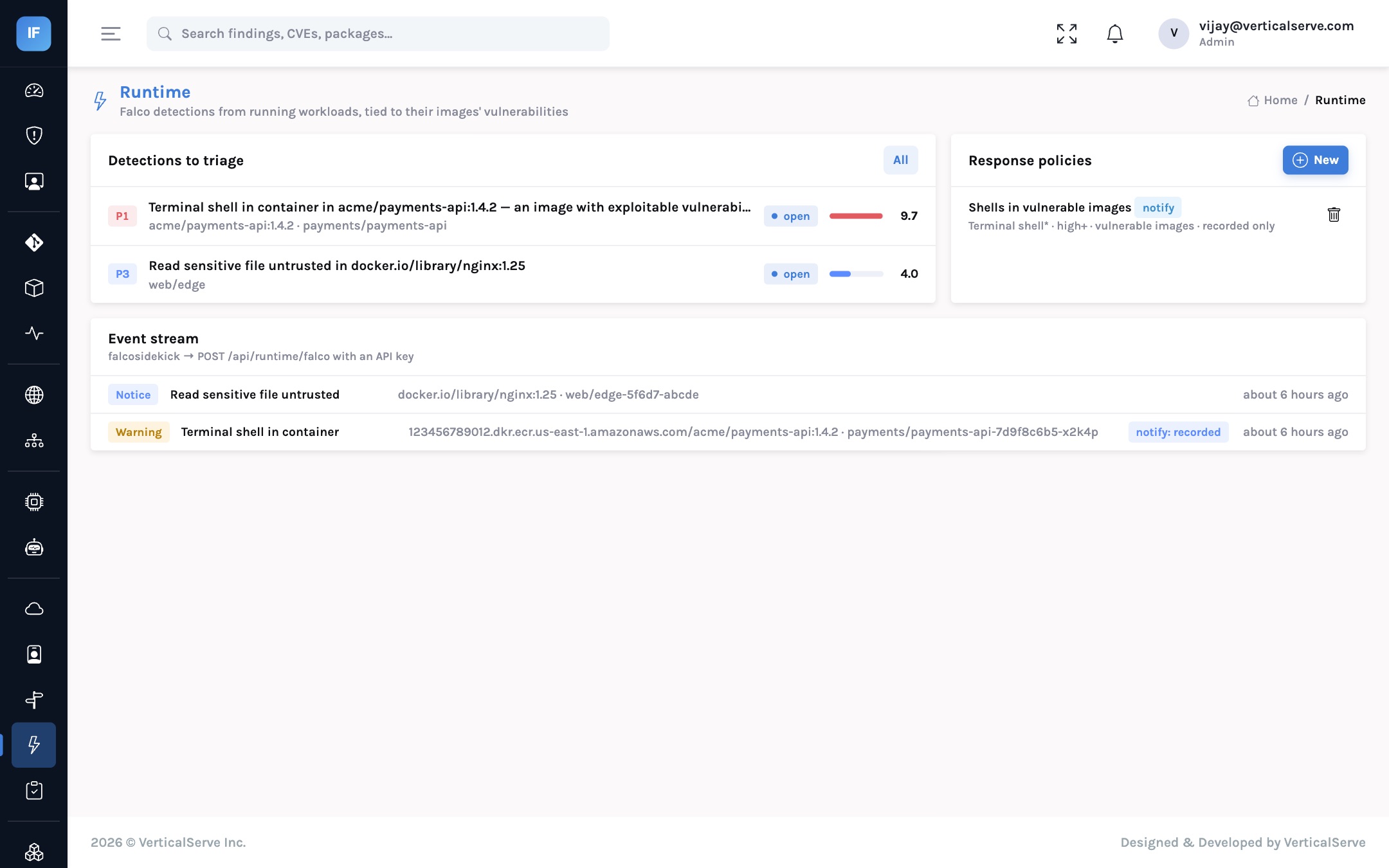
falcosidekick forwards Falco events to InsightFortify’s runtime endpoint
(POST /api/runtime/falco, authenticated with an API key). For each event:
- The event is stored with its rule, priority, output, host, namespace, pod and image.
- The image is matched to a registered artifact by repository and tag, which links it to the repository it was built from and the findings on both.
- If the image or its source repository has open P1 or P2 findings, the event is raised one severity level, and the finding lists those vulnerabilities.
- The detection becomes a
runtimefinding per rule and workload and is scored like everything else: detected at runtime, internet-facing, criticality and sensitive data each add their factor. - Response policies are evaluated and their decisions recorded on the event.
- Attack-path evaluation sees the runtime finding, so a workload that is both exploitable and showing suspicious activity is visible in the path view as well.
Illustrative. InsightFortify records the decision and hands the action to a responder you run; it never acts on the cluster itself.
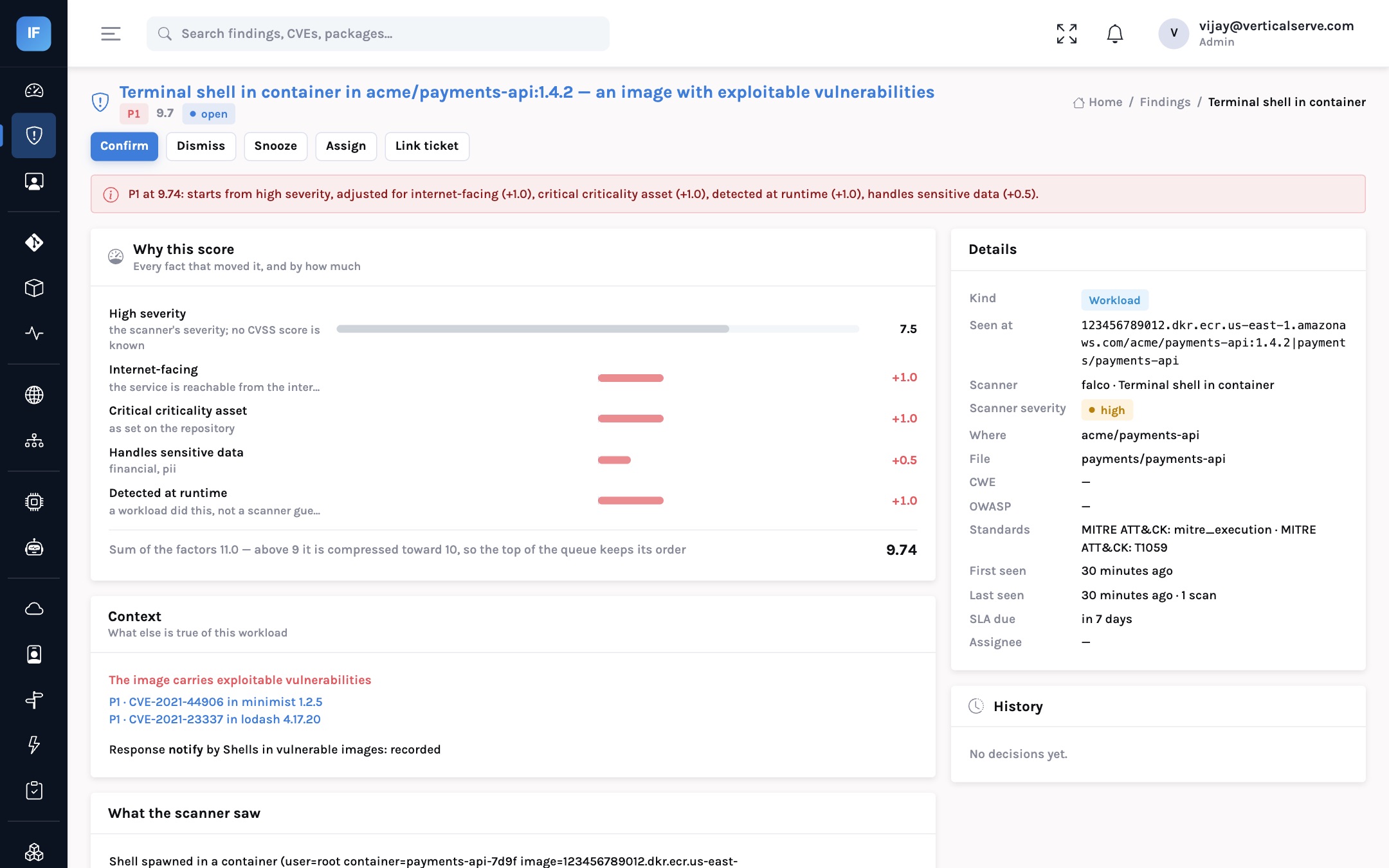
Look at the score breakdown in that screen. The Falco rule alone is “high”. The
workload context adds a point each for internet exposure, critical asset and runtime detection, and
half a point for sensitive data. The raw sum is 11.0; the top of the scale is compressed so that the
queue keeps its order above 9. The “context” panel is what the analyst needs to decide
in seconds rather than minutes: this image carries
CVE-2021-44906 in minimist and CVE-2021-23337 in
lodash, both open P1s.
Response policies: decide centrally, act locally
Automatic response to runtime alerts is where many programmes have been burned: a rule fires on a legitimate debug session and a production pod is killed. The design choice here is to separate the decision from the action, and to make the decision conditional on vulnerability context.
| Policy field | What it does | Example |
|---|---|---|
| Falco rules | Which rules it applies to; wildcards allowed; empty means all | Terminal shell*, Write below etc |
| At or above | Minimum priority after correlation | high |
| Action | notify, isolate, stop or label | label for quarantine |
| Webhook | Where the decision is sent; required for anything other than notify | Falco Talon, a Lambda, a SOAR |
| Only vulnerable images | Fire only when the image has open P1/P2 vulnerabilities | On, for any action stronger than notify |
The “only vulnerable images” switch is the important one. It lets you start with automatic containment where the evidence is strongest, a suspicious action in a workload already known to be exploitable, while everything else is a notification. The responder that holds cluster credentials is yours, runs inside your environment, and receives the triggering event with the action, so its own audit trail is complete.
The first hour, step by step
P1 runtime finding created with the image, pod, namespace and the image’s open P1 CVEs attached.
Label the pod for quarantine; notify the security channel. Decision recorded on the event.
Was an engineer in the pod? Check the change calendar and break-glass log. Confirm the finding if not explained.
Isolate the pod or scale the deployment to a known-good image, under your incident process.
Upgrade minimist and lodash, rebuild, redeploy. The image’s P1s close on the next scan.
Open the task role’s blast radius: what could the shell have reached? Review CloudTrail for that window.
Was the policy right? Should isolate be automatic for this rule on vulnerable images?
What changes for each audience
For the CISO
One question, “was this suspicious activity in something we already knew was weak?”, is answered by the system rather than by an analyst’s memory.
Automatic containment can be introduced gradually, starting where the evidence is strongest, without betting production on a single rule.
For the AppSec lead
The P1 vulnerabilities on the image gain a reason to be fixed today rather than within seven days, and the developer sees why in the same finding.
Runtime noise that does not touch vulnerable workloads stays at its original priority.
For the board
The measure is how quickly the organisation contains activity in exposed, vulnerable systems, which is the scenario most likely to become a reportable incident.
It is a narrow, meaningful number rather than an alert count.
Outcome metrics
| Metric | Definition | Why it matters |
|---|---|---|
| Time to triage, correlated runtime P1s | Detection to confirm or dismiss | Shows whether correlation is surfacing the right alerts first |
| Time to containment | Detection to isolation or replacement of the workload | The figure an incident review and a regulator will ask for |
| Runtime findings on vulnerable images | Count per week, by service | Where attackers are likely already probing |
| Share of images registered | Running images that are matched to an artifact | Uncorrelated events cannot be raised; coverage is the precondition |
What it does not do
InsightFortify does not run on your nodes and does not replace Falco or your SOC tooling; it receives Falco’s events and adds the vulnerability context. It does not take actions on the cluster; it sends the decision to a responder you run. And correlation depends on images being registered: an event from an image nobody registered is stored and scored, but without the vulnerability join.
A runtime alert is noise until you know what the workload was already exposed to.
Join the detection to the image’s vulnerabilities, raise what deserves raising, and decide the response centrally while acting with your own tools.