Every year the same weeks arrive. The auditor sends a request list, the security team exports scanner results into spreadsheets, someone takes screenshots of cloud consoles, and an engineer spends a fortnight reconciling three tools that disagree about how many critical vulnerabilities are open. The evidence is assembled for the audit, describes the estate as it was on one afternoon, and is out of date before the report is signed.
Most of what an auditor asks about application and cloud security is already in your findings: which requirements are failing, where, since when, and what was done about it. This post shows how to turn that into audit preparation, and is candid about the parts no scanner can evidence.
In short
- Map findings to requirements once, at the source. Cloud posture and IaC checks already carry the framework requirements they test. Keep that mapping and audit questions become queries.
- Show failures, not a percentage passed. Not every control can be checked automatically; a compliance score implies coverage you do not have. A failures-only view is more honest and more useful.
- Evidence is the history, not the snapshot. When a finding was first seen, who triaged it, when it was fixed and whether it met its SLA is what demonstrates a working control.
- Be clear about the boundary. Policies, training, access reviews and vendor management still need their own evidence. Automating what can be automated frees time for those.
What auditors are actually asking
Frameworks differ in wording but converge on the same questions about software and infrastructure security: do you know what you run, do you find its weaknesses, do you fix them in a defined time, and can you prove it.
| Framework | Requirements that touch application and cloud security (examples) |
|---|---|
| PCI DSS 4.0 | 6.3.2 inventory of bespoke and custom software and third-party components; 6.3.3 critical patches within one month; 6.4 protection of public-facing web applications; 11.3 vulnerability scanning; cloud configuration under requirements 1, 2 and 7 |
| SOC 2 | CC6 logical access (least privilege, access removal); CC7.1 detection of configuration changes and vulnerabilities; CC8.1 change management |
| ISO/IEC 27001 | Annex A technical vulnerability management (8.8 in the 2022 edition), secure configuration, secure development, access control |
| NIST SP 800-53 Rev. 5 | RA-5 vulnerability monitoring and scanning; SI-2 flaw remediation; AC-6 least privilege; CM-6 configuration settings |
| CIS Benchmarks | Concrete configuration checks for AWS, Azure, Google Cloud, Kubernetes and more; often the technical baseline the others reference |
data
PCI DSS v4.0 introduced a set of future-dated requirements that became mandatory on 31 March 2025, including more explicit expectations for software component inventories and for protecting payment-page scripts. Many organisations found their first v4.0 assessment against the full requirement set came after that date.
Source: PCI Security Standards Council, PCI DSS v4.0 and v4.0.1 summary of changes and implementation timeline.
Where the mapping comes from
The mapping is not invented by InsightFortify. It comes from the scanners that test the controls:
- Cloud posture checks run through Prowler, whose checks carry their mappings to CIS, PCI DSS, SOC 2, ISO 27001, NIST 800-53, HIPAA and others. Each cloud finding keeps the requirements its check maps to.
- Infrastructure-as-code findings from Checkov name the benchmark controls they correspond to.
- Other findings carry their own standards, such as CWE, OWASP Top 10 categories, the OWASP LLM Top 10 and MITRE ATT&CK techniques, which are useful context but not framework requirements, so they are not counted in the compliance view.
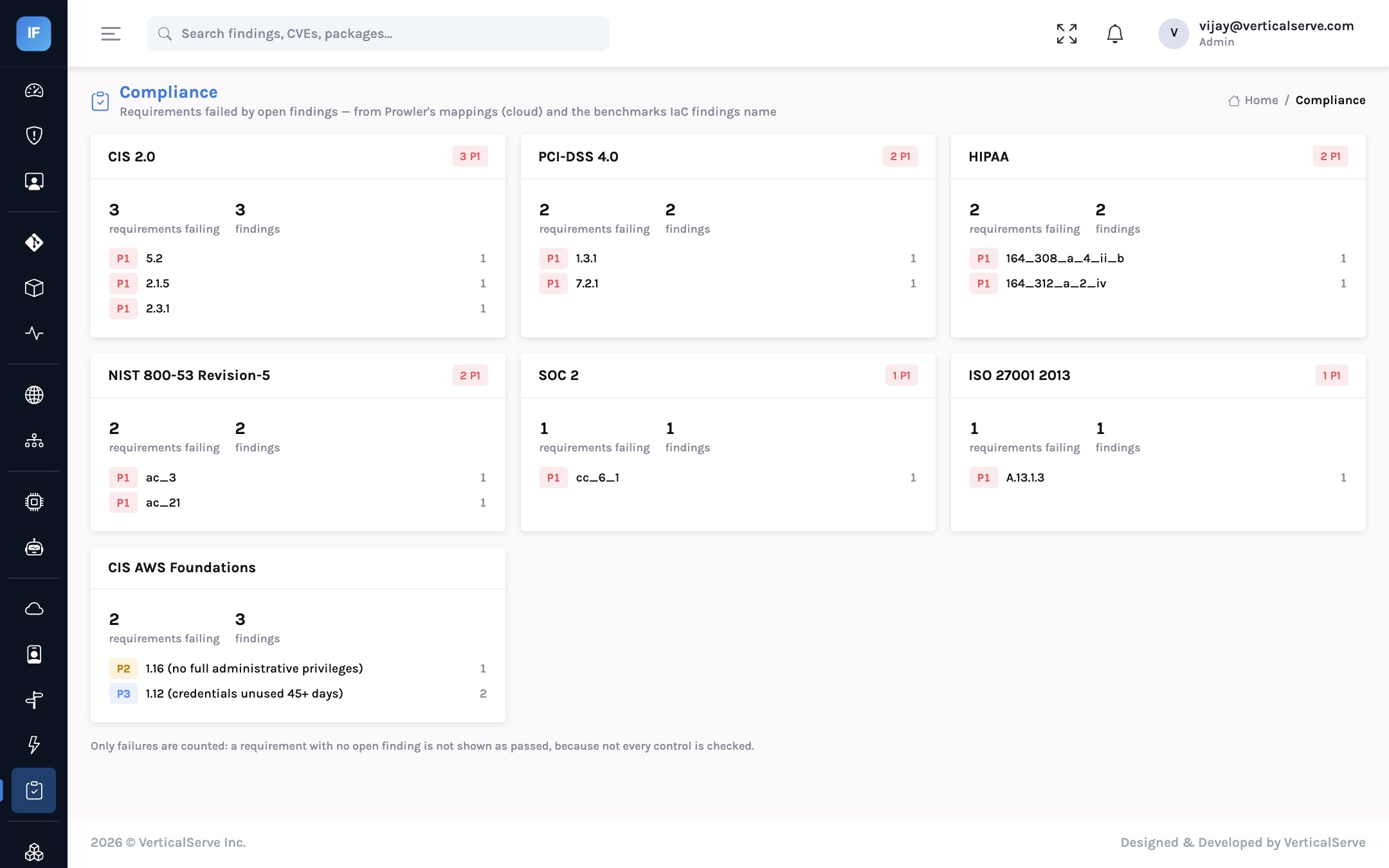
The compliance view then groups every open finding by framework and requirement, sorted worst first by priority and then by the number of findings. Clicking a requirement opens the findings that fail it.
Why there is no “87% compliant” number
A percentage needs a denominator, and the honest denominator is every control in the framework. Scanners test a subset of those: configuration and code, not policies, training, physical security or supplier management. A dashboard that shows 87% compliant because 87% of the checked controls passed invites a board to believe something that is not true. We show what is failing, and leave the claim of compliance to the assessment.
From audit request to evidence
Illustrative. The auditor role gives read-only access to findings and the audit trail, so sampling can happen in the system rather than in screenshots.
The most persuasive evidence of a working vulnerability management control is not a list of open findings. It is the record of what happened to findings over the period: first seen, triaged by whom, assigned to whom, snoozed until when and why, fixed when, and whether that was inside the SLA for its priority. Each finding carries that history, and every triage decision is recorded in the audit trail with the person who made it.
CIS, PCI, SOC 2, ISO, NIST"] --> C["Findings keep
their requirements"] B["Checkov IaC
benchmark controls"] --> C C --> D["Group open findings
by framework and requirement"] D --> E["Compliance view
failures only, worst first"] C --> F["Finding history
triage, SLA, fixed date"] E --> G["Evidence for auditor"] F --> G H["Audit trail
who decided what"] --> G
An audit-prep runbook
Every in-scope account and repository is connected and has been scanned recently. Out-of-coverage systems are a finding in themselves.
Start with P1 findings against in-scope frameworks. Each needs a fix date or an exception.
Assign each finding to the owning team; the SLA due date is already set by priority.
A snooze carries an end date; a dismissal carries its reason. Both, and who made them, are in the audit trail.
Fixed findings close themselves on the next scan; nobody marks them fixed by hand.
Export the filtered findings per requirement; include SLA performance for the period and the audit trail of decisions.
An auditor account can sample findings and history directly, which shortens fieldwork.
Policies, training, access reviews and vendor due diligence are outside what scanners see.
What it does not cover
Being precise about the boundary is part of being credible with an assessor.
- Controls no scanner checks. Security policies, awareness training, background checks, physical security, incident response exercises and vendor management need their own evidence. InsightFortify does not collect it.
- A formatted audit report. There is no PDF or assessor-ready report generator today; evidence comes from the compliance view, filtered findings exports, finding histories and the audit trail.
- Your assessor’s interpretation. A Prowler mapping says a check relates to a requirement; whether failing it fails the requirement in your context is the assessor’s call. Use the mapping to find the gaps, not to grade yourself.
What changes for each audience
For the CISO
Audit preparation becomes a continuous view rather than an annual project, and you see the gaps months before the assessor does.
The same data that drives remediation drives compliance, so the two never disagree.
For the AppSec lead
Fewer evidence requests interrupting engineering. The history of each finding answers “when did you know and what did you do?” without a meeting.
Exceptions are recorded: dismissals with a reason, snoozes with an end date, both with the person who decided.
For the board
A truthful statement of posture: these requirements are failing, in these systems, and these are the dates they will be fixed.
No inflated compliance percentages that a later incident could contradict.
Outcome metrics
| Metric | Definition | Why it matters |
|---|---|---|
| Failing requirements per framework | Requirements with at least one open finding | The gap list; should shrink before each assessment |
| P1 findings against in-scope frameworks | Open, highest priority, mapped to a requirement | What an assessor is most likely to sample |
| SLA adherence for the period | Share of findings fixed within their priority’s SLA | The core evidence that the control operates |
| Repeat snoozes | Findings snoozed again after their end date | Risk acceptance that never ends is a common audit finding |
| Evidence preparation effort | Person-days spent assembling evidence | The cost the programme is meant to reduce |
An audit should check a control that runs every day, not a spreadsheet assembled for the week of the audit.
Keep each finding’s framework mapping and its history, show failures rather than a flattering score, and give the auditor read-only access to the system of record.